AI-Powered 3D Modeling Guide for Designers to Elevate Creativity
AI-powered 3D modeling refers to the use of artificial intelligence tools to create, enhance, modify, or optimize 3D assets. Traditionally, 3D modeling required manual input, which could be time-consuming, skill-intensive, and repetitive. AI tools were developed to solve these challenges by automating tasks, predicting shapes, generating textures, and assisting designers in the creation process.
These tools exist because the demand for high-quality 3D content continues to grow across industries such as gaming, architecture, product design, animation, virtual reality (VR), augmented reality (AR), e-commerce, and manufacturing. As projects become more complex, designers benefit from systems that can rapidly convert ideas into 3D models, analyze errors, and refine designs.
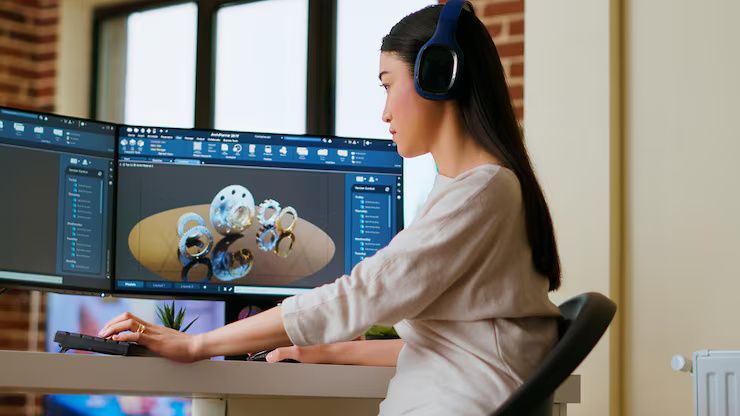
AI systems support both beginners and experts by offering guided workflows, automated mesh generation, and intelligent suggestions. Instead of replacing designers, AI functions as an assistive technology that boosts creativity and reduces repetitive workload.
Importance – Why AI-Powered 3D Modeling Matters Today
AI-powered 3D modeling has transformed creative workflows. It matters today because it helps artists, designers, architects, engineers, and creators achieve results faster and with greater precision.
1. Enhanced Productivity
AI automates tasks like retopology, texture generation, rigging, and object scanning. These tasks traditionally require hours of manual work. Automation allows designers to focus on artistic decisions instead of repetitive processes.
2. Accessibility for Beginners
New designers can create basic models without mastering complex software techniques. AI offers guided suggestions, presets, and automatic corrections.
3. Faster Prototyping
Industries such as product design, automotive, and architecture use AI to create quick prototypes. This reduces design cycles and improves communication with clients and teams.
4. Better Error Detection
AI models can analyze meshes and identify potential structural issues, reducing the likelihood of design flaws during manufacturing or animation.
5. Realistic and Consistent Quality
AI-powered texturing tools generate high-resolution materials and lighting variations that maintain consistency across large projects.
6. Cost Efficiency
By reducing production time and labor requirements, AI improves operational efficiency across organizations.
7. Creativity Amplification
AI can generate new design ideas, random variations, and experimental concepts that inspire designers. It supports creative exploration that may not be possible manually within time constraints.
Overall, AI-driven modeling benefits professionals in designing buildings, products, characters, environments, and digital assets.
Recent Updates – Trends and Advancements in 2024–2025
The past year saw significant improvements in AI modeling technologies, making them more powerful and accessible across industries.
1. Growth of Text-to-3D Generation (2024–2025)
AI models that convert text prompts into 3D objects became more refined. Tools released throughout 2024 improved the accuracy of geometry, textures, and lighting.
2. Real-Time AI Sculpting (Early 2024)
New updates introduced real-time AI enhancements that modify models instantly while sculpting, offering smarter brush behaviors and auto-corrections.
3. Expansion of Photogrammetry and NeRF Technology (2024)
Neural Radiance Fields (NeRFs) advanced significantly, allowing faster and more realistic 3D reconstructions from images or video.
4. Integration With Popular 3D Software (Late 2024–Mid 2025)
Major platforms introduced built-in AI features, such as automatic UV unwrapping, mesh cleanup, and material generation.
5. Increased Use in AR/VR Pipelines
AI modeling tools became more compatible with AR and VR platforms, improving efficiency for real-time environments and simulation work.
6. AI-Assisted Animation and Rigging
Software updates in 2024 introduced human motion prediction and auto-rigging features, reducing manual rig setup time.
These updates indicate rapid evolution, making AI modeling more accurate, responsive, and easy to integrate into existing workflows.
Laws or Policies – Regulations Influencing AI and 3D Modeling
AI-powered 3D modeling is shaped by policies related to intellectual property, digital asset creation, privacy, and AI governance. These regulations aim to ensure responsible use and protect designers’ rights.
1. Copyright and Intellectual Property Guidelines
3D models created using AI must follow copyright laws. Designers remain responsible for verifying ownership rights of reference materials and ensuring their models do not replicate protected assets.
2. Data Usage Regulations
Models trained on datasets must align with data privacy guidelines. Many countries require transparent data sourcing to avoid unauthorized use of personal or sensitive information.
3. AI Accountability and Transparency Policies
Governments are developing frameworks to guide responsible AI use. These policies encourage:
-
Clear documentation
-
Ethical training practices
-
Monitoring of automated decisions
4. Digital Product Compliance
Industries like architecture, medical devices, and manufacturing follow quality and safety standards. AI-generated models must comply with design guidelines used in those sectors.
5. Open Data and Innovation Support Programs
Some regions encourage AI innovation through:
-
Grants
-
Research incentives
-
Digital skill-building programs
These policies help designers adopt modern technologies while staying compliant with industry standards.
Tools and Resources – Useful Apps, Websites, and Assistive Platforms
Below is a list of helpful tools designers can use for AI-driven 3D modeling, concept creation, and workflow improvement.
Helpful AI Tools and Resources
| Tool / Resource | Purpose / Benefit |
|---|---|
| AI Text-to-3D Generators | Convert text prompts into 3D shapes for quick ideation. |
| Photogrammetry Apps | Capture images to create detailed 3D models. |
| Mesh Cleanup Tools | Repair geometry and optimize models. |
| AI Texture Generators | Create materials such as wood, metal, skin, or fabric. |
| Model Optimization Software | Reduce polygon count for AR/VR or mobile apps. |
| AI Integration Plugins | Add automation features to existing 3D programs. |
| Cloud-Based Rendering Tools | Speed up rendering with AI-accelerated power. |
| Learning Platforms | Offer tutorials on AI modeling techniques. |
These tools help designers improve creativity, accuracy, and efficiency across various project types.
FAQs – Clear and Factual Answers
1. Is AI-powered 3D modeling suitable for beginners?
Yes. Beginners can benefit from guided workflows, auto-correct tools, and simple interface options that make learning easier.
2. Can AI replace manual 3D modeling completely?
AI assists with many tasks, but designers still provide artistic direction, quality control, and creative decision-making. It enhances the workflow rather than replaces it.
3. What industries use AI-driven 3D modeling?
Common industries include gaming, film, architecture, engineering, manufacturing, product design, and AR/VR content creation.
4. Are AI-generated 3D models copyright-safe?
It depends on the sources used for training. Designers should verify originality, follow copyright laws, and avoid using protected references without permission.
5. Does AI modeling require high-end hardware?
Some tools run locally and may require strong GPUs, while others use cloud processing, making them accessible on standard devices.
Final Thoughts
AI-powered 3D modeling is reshaping how designers approach creativity, productivity, and problem-solving. By automating repetitive tasks and generating new design possibilities, AI enables both beginners and professionals to explore ideas more quickly and effectively. The technology continues to evolve with advancements in text-to-3D generation, real-time sculpting, and photogrammetry, making it more accessible and efficient across various industries. Designers who stay informed about regulations, tools, and best practices can integrate AI confidently into their workflows. As the field continues to grow, AI will remain a valuable partner in expanding creative potential and improving design processes.